One Stop Digital Inc
  • About Us
  • Digital Marketing
    • Search Engine Marketing
    • Social Media Marketing
    • Content Marketing
    • Business Intelligence
    • Digital Media Consulting
    • Project Management
  • Design
    • Creative Design
    • Web Design
    • Videos and Animation
  • Blog
  • Contact Us
See 30s Demo
What to put on a contact form for a small business website
  • By: HRS
  • Aug 31
  • Comments (0)

You’re building your website and reach the contact form.

Name. Email. Phone. Company. Budget. Service. Timeline. Address. How did you hear about us?

Before long, asking a simple question feels like applying for a mortgage.

So, what do you actually need?

Start with the essentials

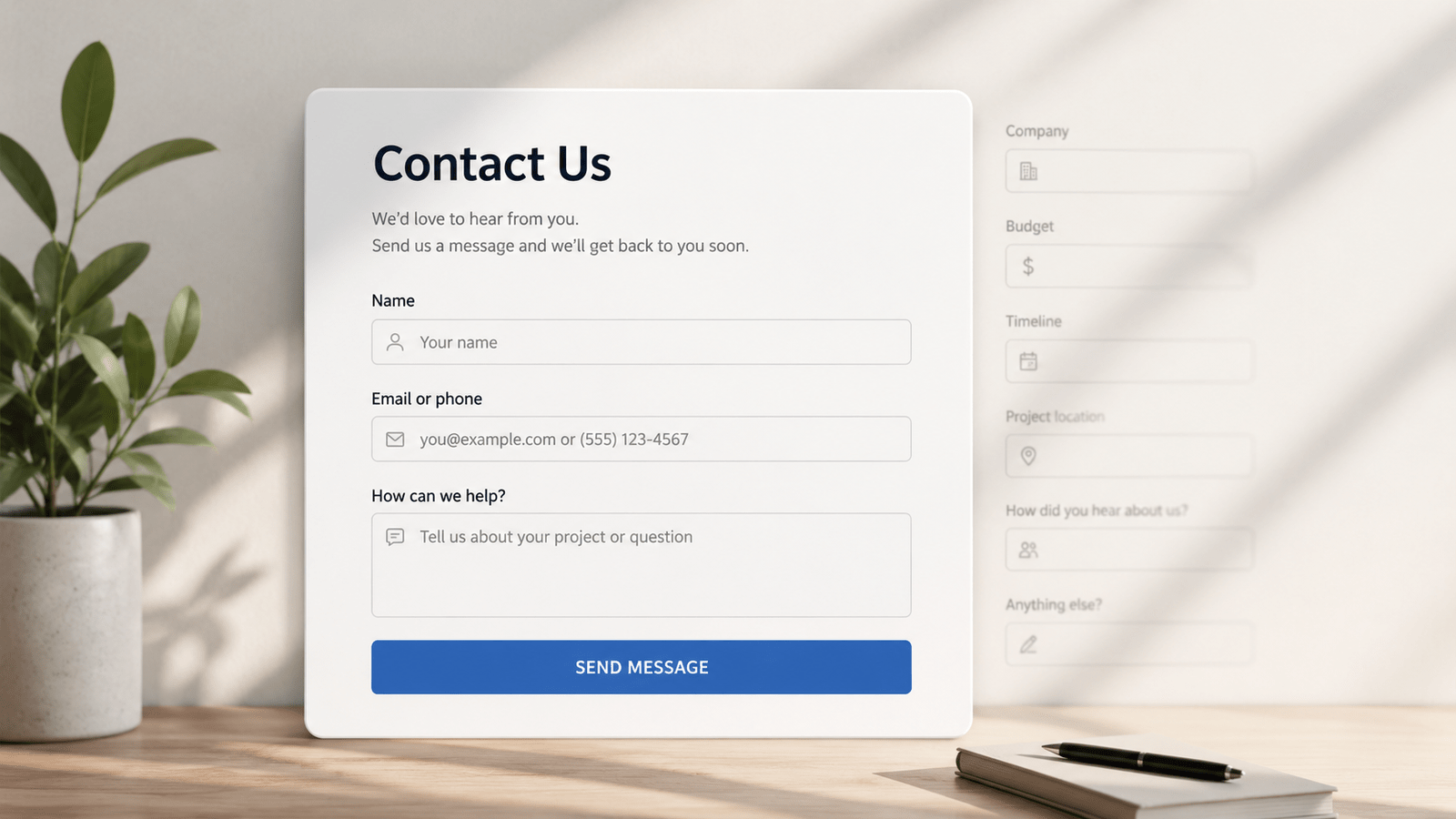
For many small businesses, three fields may be enough:

Name
Email or phone
How can we help?

Every additional field should have a reason for being there.

A contractor might need a project location. A photographer might need an event date. A consultant might want to know which service someone is interested in.

Ask yourself: Will knowing this help me respond better?

If not, consider removing it.

Qualification vs. friction

Questions about budget, timeline or company size can help filter inquiries. But there’s a trade-off.

More fields give you more information. They also give your visitor more work.

If you’re receiving lots of irrelevant inquiries, qualification questions may help. If hardly anyone completes your form, adding more questions probably isn’t the solution.

And don’t make every field mandatory. If you’d like a phone number but can respond by email, consider making it optional.

Your contact form is part of the conversion process. As I discussed in Pretty Websites Don’t Necessarily Generate Leads, a good-looking website still needs to make it easy for visitors to take the next step.

Collect more without asking more

Not everything needs to be a visible field.

Hidden fields can automatically capture useful information such as the page where the form was submitted and UTM parameters from your marketing campaigns.

For example:

utm_source: Google
utm_medium: CPC
utm_campaign: summer-promo

Pass this information with the submission or into your CRM, and you can understand where inquiries came from without asking visitors another question.

This also makes it easier to identify which campaigns and channels are actually generating leads.

A simple rule

For every visible field, ask:

“What will I do differently with this information?”

If you don’t have a good answer, you probably don’t need it.

Tags:
  • Contact Forms
  • Conversion Rate Optimization
  • DIY Marketing
  • Lead Generation
  • Website Design

Post navigation

Previous Post Previous Post
What Marketing Should You Do First With $500?
Next Post Next Post
How to Use UTMs to Track Leads

Categories

  • Analytics and Business Intelligence (5)
  • Content Marketing (1)
  • Digital Media Consulting (15)
  • Graphic Design (1)
  • Search Engine Marketing (7)
  • Social Media Marketing (4)
  • Web Design (3)

Skill Level

  • Advanced (5)
  • Beginner (10)
  • Expert (1)
  • Intermediate (19)

Tags

AI Marketing (2) Business Intelligence (2) Content Marketing (2) Content Strategy (2) Conversion Optimization (3) Conversion Rate Optimization (3) Conversion Tracking (4) CRM (2) Customer Acquisition Cost (1) Customer Journey (1) Data Analysis (1) Digital Advertising (2) Digital Marketing (10) DIY Marketing (12) Entrepreneurs (3) Full Funnel Marketing (4) GA4 (2) Google Ads (8) Google Search (2) Lead Generation (22) Marketing Analytics (7) Marketing Automation (2) Marketing Budget (2) Marketing Channels (2) Marketing Dashboard (1) Marketing Reporting (1) Marketing ROI (6) Marketing Strategy (16) Meta Ads (3) Organic Social Media (2) PPC (6) SEO (3) Small Business (4) Small Business Marketing (16) Small Business SEO (2) Small Business Website (1) Social Media Analytics (1) Social Media Marketing (3) Social Media ROI (1) Social Media Strategy (3) Startups (4) UX Design (1) Web Design (2) Website Conversion (1) Website Redesign (1)

Recent Posts

Customer avatar between a gold dollar sign and red question mark, illustrating uncertainty in customer lifetime value calculations.

Your Customer Lifetime Value Is Fiction

14 Oct 2026
Social media marketing illustration contrasting valuable educational content with constant sales pitches and promotional calls to action.

Stop Selling in Every Social Media Post

13 Oct 2026
Leaking bucket filled with money illustrating the sunk cost fallacy in marketing budgets and underperforming advertising campaigns.

Your Marketing Budget Has a Sunk Cost Problem

09 Oct 2026

Archives

  • October 2026 (5)
  • September 2026 (18)
  • August 2026 (12)
OSD Logo 2026

Get every digital marketing solution you need seamlessly executed under one roof.

    Our Services

    • Search Engine Marketing
    • Social Media Marketing
    • Content Marketing
    • Business Intelligence
    • Digital Media Consulting
    • Project Management
    • Creative Design
    • Web Design
    • Videos and Animation

    Useful Links

    • Privacy Policy
    • Cookies Policy
    • Disclaimer

    Get In Touch

    Ready to unscramble your marketing? Send us a message or request a strategy session.

    info@onestopdigitalinc.com
    Edmonton, Alberta, Canada
    Contact Us →

    © Copyright 2026 | One Stop Digital Inc | All right reserved.

    One Stop Digital Inc
    We value your privacy
    To provide the best experiences, we use technologies like cookies to store and/or access device information. Consenting to these technologies will allow us to process data such as browsing behavior or unique IDs on this site. Not consenting or withdrawing consent, may adversely affect certain features and functions.
    Functional Always active
    The technical storage or access is strictly necessary for the legitimate purpose of enabling the use of a specific service explicitly requested by the subscriber or user, or for the sole purpose of carrying out the transmission of a communication over an electronic communications network.
    Preferences
    The technical storage or access is necessary for the legitimate purpose of storing preferences that are not requested by the subscriber or user.
    Statistics
    The technical storage or access that is used exclusively for statistical purposes. The technical storage or access that is used exclusively for anonymous statistical purposes. Without a subpoena, voluntary compliance on the part of your Internet Service Provider, or additional records from a third party, information stored or retrieved for this purpose alone cannot usually be used to identify you.
    Marketing
    The technical storage or access is required to create user profiles to send advertising, or to track the user on a website or across several websites for similar marketing purposes.
    • Manage options
    • Manage services
    • Manage {vendor_count} vendors
    • Read more about these purposes
    View preferences
    • {title}
    • {title}
    • {title}