


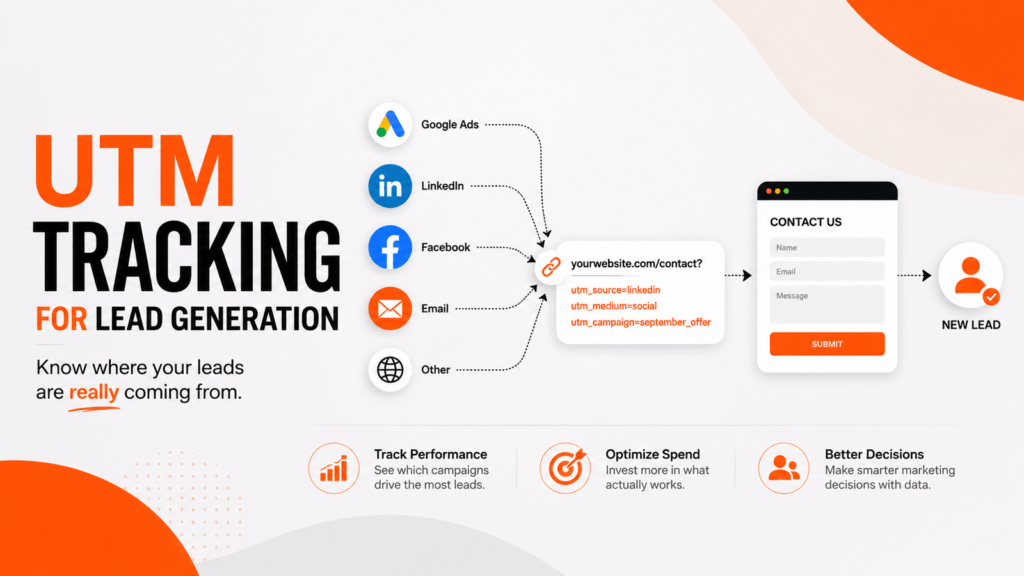
You share a link to your website on LinkedIn. The same page is promoted through Google Ads and included in an email campaign.
A week later, someone fills out your contact form.
Which marketing activity brought them there?
That’s one of the problems UTM parameters can help solve.
What are UTM parameters?
UTMs are small pieces of tracking information added to the end of a URL. They tell your analytics tools more about where a visitor came from.
A tracked link might look like:
yourwebsite.com/contact/?utm_source=linkedin&utm_medium=social&utm_campaign=september_offer
The page is the same. The extra information simply helps identify the traffic source.
Five common UTM parameters are:
- utm_source: Where the visitor came from, such as
google,linkedinornewsletter - utm_medium: The marketing channel, such as
cpc,socialoremail - utm_campaign: Your campaign name
- utm_content: Identifies different ads, links or creative
- utm_term: Often used for paid-search keywords
You don’t necessarily need all five. For a simple campaign, source, medium and campaign may be enough.
How do UTMs help with lead generation?
Imagine someone clicks your LinkedIn link and submits your contact form.
If your form captures the UTM values using hidden fields, those values can be submitted along with the person’s contact information and passed into your CRM.
Instead of seeing:
New lead: Jane Smith
you could potentially see:
Source: LinkedIn | Medium: Social | Campaign: September Offer
The visitor doesn’t have to enter any of this manually.
UTMs can also be analyzed in tools such as Google Analytics to understand which campaigns are driving website activity.
The important thing to remember is:
UTMs don’t generate leads. They help you understand which marketing activities are generating them.
Once you know that, you can make better decisions about where to spend your time and marketing budget.
For more on deciding what is actually worth measuring, read If I Could Track Only 5 Marketing Numbers, These Would Be Them.